
Your logo is exempt. Your buttons aren't.
Most brand palettes are chosen to look right in a deck, then fail the moment they become text and buttons. The fix belongs in the brand system, not in a widget bolted on afterwards.
- Section
- Brand
- By
- Simon Lodge
- Published
- 28 October 2026
- Reading
- 6 min read

Here is a rule about brand colour contrast that almost nobody in a brand presentation knows. Under the web’s accessibility guidelines, a logo has no contrast requirement at all. In fact, WCAG says so plainly: text that is part of a logo or brand name is exempt (W3C).
So the mark is fine. The trouble starts when the brand colour leaves the logo.
It becomes a link. Then a button. Then the pale caption under a product shot that someone thought looked quieter. Now it has to reach a contrast ratio of 4.5:1 against its background, or 3:1 for large text. That is where most brand systems quietly fall apart.
Brand colour contrast is the web’s most common failure
Every year WebAIM tests the home pages of the top million websites for accessibility. The 2026 report found detectable failures on 95.9% of them. The most common problem by far was low-contrast text. It appeared on 83.9% of pages, with 34 instances on the average home page, up 15% on the year before.
That should embarrass our industry, because contrast is the easiest accessibility problem to understand. It is also one of the cheapest to prevent. Nobody needs a specialist to see that grey text on a lighter grey is hard to read.
Yet it survives, because the decision happens upstream of the people who would catch it. A brand team signs off a palette in a deck, on a large bright screen. Everyone in the room has good eyesight. Nobody tests the coral as 14px body copy on white, since in the deck it was never body copy.
Colour Blind Awareness puts colour vision deficiency at around 1 in 12 men, or roughly three million people in the UK. Then add everyone reading a phone in sunlight. Add everyone over fifty, too, and everyone who turns the brightness down to save battery. Low contrast fails a small group badly and everybody else a little, all day.
The European Accessibility Act reads like a type brief
For EU consumers, this stopped being a courtesy on 28 June 2025. That was the day the European Accessibility Act began to apply. It covers services sold to consumers in the EU, such as e-commerce, banking, e-books and passenger transport.
Scope follows the customer, not the company. So a UK business selling online to shoppers in Dublin or Munich is in it. Microenterprises that provide services are exempt, meaning fewer than ten people and under €2 million in turnover.
What surprises people is how specific the Act gets. For example, it asks for information “presented in fonts of adequate size and suitable shape” and “using sufficient contrast”. Where colour carries meaning, it also wants an alternative to colour. That is a typography brief, written into European law.
At home, the rules already apply. GOV.UK’s guidance says that all UK service providers have a duty to make reasonable adjustments under the Equality Act 2010. Plenty of B2B companies sit outside the EAA, of course. Still, their buyers have eyes.
Why the quick fix makes brands ugly
When an audit lands late, the instinct is to darken whatever fails. You add black to the blue until it passes, then do the same to the green. Repeat that across a palette and the brand slowly turns to mud.
GOV.UK’s designers found exactly this when they rebuilt their own colours in 2019. Patch by patch, the scheme had become “darker and duller” (GOV.UK Design Notes). So they created contrast with brightness and saturation instead of black. The blue moved from #005ea5 to a brighter #1d70b8, while the yellow got yellower.
Stripe hit the same wall. An audit showed that none of its default small-text colours passed, apart from black (Stripe). Darkening them made the product look “dark and muddy”. Instead, the team rebuilt the whole colour system using a perceptual colour model. As a result, every step in a scale behaved predictably. The new palette passed, and it still looked like Stripe.
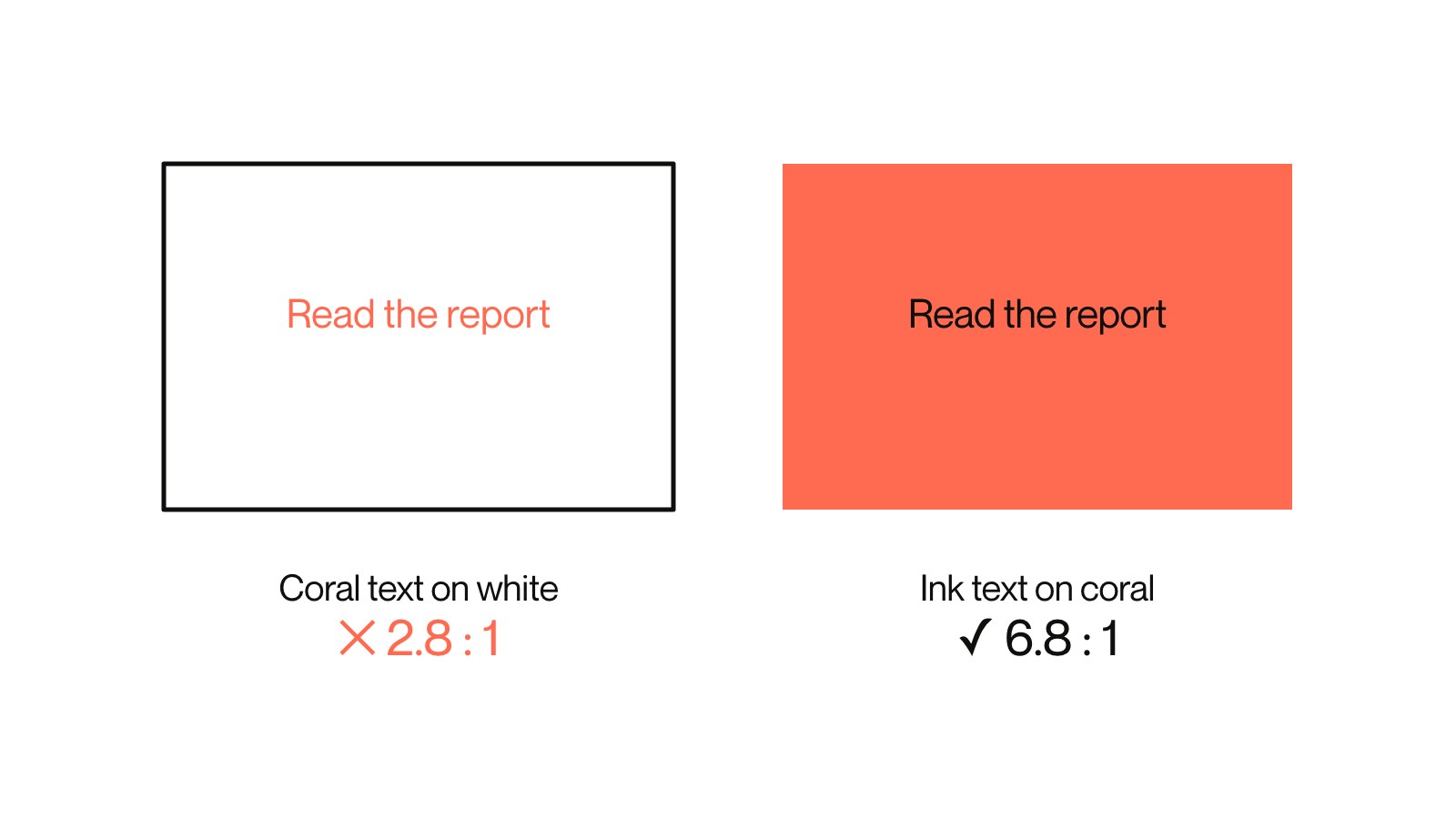
Accessibility patched in late makes a brand duller. Designed in early, nobody can tell it was ever a constraint.
Both stories make the same point. The trade between distinctive and accessible only looks real when accessibility arrives late, as a list of failures.
A widget can’t change your blue
A whole industry sells the opposite idea: one line of JavaScript that promises to make any site compliant. Accessibility experts have been blunt about it. More than a thousand of them have signed the Overlay Fact Sheet, including people at WebAIM, Google and Microsoft. It states that no overlay can make a website fully compliant with any standard.
Regulators agree. In April 2025 the US Federal Trade Commission approved an order requiring accessiBe, a well-known vendor, to pay $1 million. The complaint covered claims that its plug-in could make any site compliant. It also covered reviews that weren’t as independent as they looked.
A script on top of your pages can’t revisit a decision about your brand blue. At best, it hides it.
Put the colour contrast rules in the palette
Treat colour contrast as a property of the brand, decided once, rather than a defect found on every page. In practice, that means some unglamorous work at the identity stage.
First, test every colour as text and as a background, at real sizes. Do it before anyone falls in love with a shade. Then write the result next to the hex value, so each colour carries its own rules. This coral is for large headlines and shapes, never body copy. This ink is safe on everything.
Next, design pairs rather than swatches. Some colours will never pass on white. For instance, GOV.UK’s bright yellow scores about 1.35:1 against white but over 15:1 against black. So keep the yellow and put dark text on it.
Also give the greys a floor. Most failures come from the light grey that someone picked for captions because it looked refined. Decide the lightest grey allowed to carry words, and stop there.
Finally, build it all into the tools people actually use: the tokens, the templates and the components. That way the accessible choice is also the default one. It is the same argument we made about the switch. The details nobody notices are the ones everybody feels, and brand colour contrast is the most common of them.
People judge a brand in use. A palette that shines in the launch deck but fails on a phone in daylight isn’t finished. Someone has simply approved it.